Tristan Watkins on IT Infrastructure
Troubleshooting SharePoint 2010 and ULS log changes
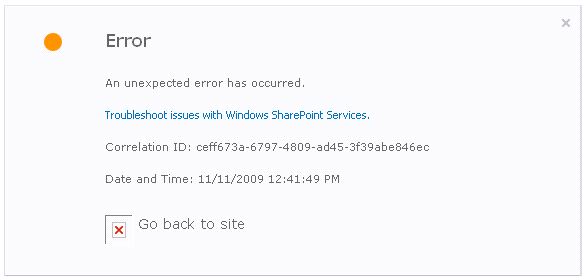
SharePoint 2010 ULS logging adds a very useful new column called the Correlation ID. The ID tracks a request and greatly simplifies finding detailed error logging in SharePoint trace logs. Additionally, Mattias Karlson points out that there’s a new CodePlex project called ULSViewer which parses SharePoint 2010 logs in a friendly view.
The correlation ID in a SharePoint 2010 error message:
The Trace logs in ULS Viewer, filtered by the Correlation ID:
On Twitter
My TweetsRecent Comments
- JohnLong on Adding Drivers to Windows Deployment Services Boot Images
- Boog on How to enable Lync audio within a Remote Desktop session
- Tristan Watkins on How to enable Lync audio within a Remote Desktop session
- Perl on How to enable Lync audio within a Remote Desktop session
- ShamrockSoft on No Lossless Audio With Zune
Categories
- Administrivia (1)
- Authentication (10)
- Business Continuity (2)
- Client applications (17)
- Consultancy and Design (17)
- Hardware (9)
- IT Management (12)
- Miscellaneous (5)
- Mobile (3)
- Networking (18)
- Office 365 Grid (3)
- Performance (26)
- Power (2)
- Security (20)
- SharePoint (76)
- Unified Communications (3)
- Virtualisation (30)
- Windows (53)
Tags
Active Directory administration Amazon Web Services ASUS binding BLOB Caching certificates Claims Cloud DCOM Dell development DNS EC2 Graphics Hyper-V IaaS ICS IIS Information Rights Management Intel IRM Lync NUMA PowerShell RMS SAML Search SEO Service Application SharePoint 2007 SharePoint 2010 SLAT STSADM Timer Job User Information User Profile Virtual Machine VMWare w3wp Windows 7 Windows Deployment Services Windows Server 2008 R2 WorkgroupArchives by Month


