In my post yesterday on User Profile Picture Export Permissions I reviewed the requirements to export the SharePoint PictureURL profile property to the Active Directory thumbnailPhoto user attribute. Where I left off, I had identified a certificate error on our SSL-secured MySite’s wildcard certificate. You may recall that the User Profile synchronisation exported the mobile number property successfully. Given that this mobile number was updated by the end-users though the same MySite host as the User Profile picture, you may wonder why one exported successfully if there were certificate errors that interfered with the other.
Fundamentally, it’s irrelevant that this data was updated by these users in their MySites. The property could have been updated by an administrator in the User Profile Service Application. However, it appears that the User Profile export is not just exporting the URL as a string, it is actually copying the image on export; the User Profile Service Application is browsing to the SSL-secured site to pick up the image and writes it to the user’s thumbnailPhoto attribute. In this post I’ll review the evidence and explain the additional certificate trust configuration required to export an SSL-secured User Profile picture.
Certificate Trusts
While I initially stumbled across this error in the SharePoint ULS logs, it was also logged to the Windows Application event logs as a SharePoint Foundation Topology error (8311), “The root of the certificate chain is not a trusted root authority“. As I hinted at yesterday, I initially disregarded this error because it pertained to our wildcard SSL certificate and I knew that the root certificate (Equifax) would be trusted by Windows by default (this is pretty fundamental to a Public Key Infrastructure). It was only when I noticed that this event occurred as part of the User Profile Synchronisation process that I looked in to it in more detail. These were the ULS logs that first grabbed my attention:
08/31/2010 10:36:12.33    miiserver.exe (0x106C)    0x1A1C    SharePoint Foundation    Topology    e5mc    Medium    WcfSendRequest: RemoteAddress: 'http://<HOSTNAME>:32843/2caef145ca304d148378faec86645981/ProfileDBCacheService.svc' Channel: 'Microsoft.Office.Server.UserProfiles.IProfileDBCacheService' Action: 'http://Microsoft.Office.Server.UserProfiles/GetUserData' MessageId: 'urn:uuid:63e3bc90-878b-4fc4-99b5-38c8ab2a4574'
08/31/2010 10:36:12.34    w3wp.exe (0x0C34)    0x0E14    SharePoint Foundation    Topology    e5mb    Medium    WcfReceiveRequest: LocalAddress: 'http://<FULLY QUALIFIED HOST NAME>:32843/2caef145ca304d148378faec86645981/ProfileDBCacheService.svc' Channel: 'System.ServiceModel.Channels.ServiceChannel' Action: 'http://Microsoft.Office.Server.UserProfiles/GetUserData' MessageId: 'urn:uuid:63e3bc90-878b-4fc4-99b5-38c8ab2a4574'    9c26087b-cb49-40b2-93f5-f8583499eead
08/31/2010 10:36:12.34    w3wp.exe (0x0C34)    0x0E14    SharePoint Foundation    Monitoring    nasq    Medium    Entering monitored scope (ExecuteWcfServerOperation)    9c26087b-cb49-40b2-93f5-f8583499eead
08/31/2010 10:36:12.34    w3wp.exe (0x0C34)    0x0E14    SharePoint Foundation    Monitoring    b4ly    Medium    Leaving Monitored Scope (ExecuteWcfServerOperation). Execution Time=4.61966025838972    9c26087b-cb49-40b2-93f5-f8583499eead
08/31/2010 10:36:12.38    miiserver.exe (0x106C)    0x1A1C    SharePoint Foundation    General    erv2    Medium    Updating X.509 certificate validation policy
08/31/2010 10:36:12.44    miiserver.exe (0x106C)    0x1A1C    SharePoint Foundation    General    erv3    Medium    Adding X.509 certificate thumbprint '<THUMBPRINT 1>' to root authority trust
08/31/2010 10:36:12.44    miiserver.exe (0x106C)    0x1A1C    SharePoint Foundation    Topology    8311    Critical    An operation failed because the following certificate has validation errors:nnSubject Name: CN=*.<WILDCARD DOMAIN NAME>, OU=Domain Control Validated - RapidSSL(R), OU=See www.rapidssl.com/resources/cps (c)10, OU=GT12672216, O=*.<WILDCARD DOMAIN NAME>, C=GB, SERIALNUMBER= xxxxxxxxxxxxxxxxxxxxxxxxx-xxxxxx nIssuer Name: OU=Equifax Secure Certificate Authority, O=Equifax, C=USnThumbprint: <THUMBPRINT 2>nnErrors:nn The root of the certificate chain is not a trusted root authority..
08/31/2010 10:36:12.44    miiserver.exe (0x106C)    0x1A1C    SharePoint Foundation    Topology    8311    Critical    An operation failed because the following certificate has validation errors:nnSubject Name: CN=*.<WILDCARD DOMAIN NAME>, OU=Domain Control Validated - RapidSSL(R), OU=See www.rapidssl.com/resources/cps (c)10, OU=GT12672216, O=*.<WILDCARD DOMAIN NAME>, C=GB, SERIALNUMBER=xxxxxxxxxxxxxxxxxxxxxxxxx-xxxxxxnIssuer Name: OU=Equifax Secure Certificate Authority, O=Equifax, C=USnThumbprint: <THUMBPRINT 2>nnErrors:nn The root of the certificate chain is not a trusted root authority..
These certificate errors at the bottom interrupted a long series of repeated http://Microsoft.Office.Server.UserProfiles/GetUserData events. The two events at the top of this excerpt are the last in that series, so the certificate errors occurred immediately after the user data had been gathered. This was a pretty strong hint that the certificate errors were interfering with the export. I was initially pretty stumped because I knew Windows trusted this certificate and I could confirm the certificates were fully trusted when I browsed to the MySite from the server, but I didn’t know what requested the certificate and why it wasn’t trusted. So I searched around a bit and found a number of articles about adding root certificates to SharePoint 2010’s Manage Trusts, which I’ve only used for Claims and Cross-Farm Service Applications, but I noticed it also came up for FAST Search, Exchange Web Services and REST – seemingly for any web services that access SSL-secured resources, intra or inter-farm.
What I don’t understand is why SharePoint web services aren’t using the Windows certificate store as a first stop before using SharePoint’s own Manage Trusts. I’m assuming this is something to do with Claims but I’m struggling to uncover anything meaningful that can confirm or disconfirm this. In the absence of guidance, I tested exporting our wildcard certificate and the root CA’s certificate to the local machine’s and the farm account’s certificate stores to see if that would fix the problem, without success. Next I tried to import the wildcard certificate through Manage Trusts, which still did not fix the certificate errors, but when I imported the root CA’s certificate in to Manage Trusts, the next synchronisation succeeded. In an effort to get to grips with these requirements and to understand how the certificate was requested I continued to monitor in ULSViewer and the FIM Client.
Successful Export
Initially, the same two GetUserData actions ran as in the first two events above. In fact, each of the first five ULS entries were identical to the first excert above, followed by the successful addition of three certificates to the root authority trust. This was when I suspected things were working (or that I’d at least cleared the next hurdle).
08/31/2010 12:22:10.65    miiserver.exe (0x07DC)    0x1B1C    SharePoint Foundation    General    erv3    Medium    Adding X.509 certificate thumbprint '<THUMBPRINT 2>' to root authority trust
08/31/2010 12:22:10.67    miiserver.exe (0x07DC)    0x1B1C    SharePoint Foundation    General    erv3    Medium    Adding X.509 certificate thumbprint '<THUMBPRINT 3>' to root authority trust
08/31/2010 12:22:10.72    miiserver.exe (0x07DC)    0x1B1C    SharePoint Foundation    General    erv3    Medium    Adding X.509 certificate thumbprint '<THUMBPRINT 1>' to root authority trust
At this point a number of “Assemblies and Sequences” are registered. Pretty boring stuff, so omitted here. All of these events begin with SPDelegateManager or SPXmlConfigurationManager. This is followed by a few events verifying the upgrade status of the databases, confirming that upgrades are not in progress or necessary. After that there are a couple of handfuls of additional configuration checks. Continuing after all that, we see the expected HTTP GET request for the first user’s updated User Profile picture:
08/31/2010 12:22:14.61    w3wp.exe (0x1B08)    0x09EC    SharePoint Foundation    Monitoring    nasq    Medium    Entering monitored scope (Request (GET:https://<MY SITE HOST>:443/User%20Photos/Profile%20Pictures/<USER 1 PROFILE PICTURE NAME>.jpg))
08/31/2010 12:22:14.61    w3wp.exe (0x1B08)    0x09EC    SharePoint Foundation    Logging Correlation Data    xmnv    Medium    Name=Request (GET: https://<MY SITE HOST>:443/User%20Photos/Profile%20Pictures/<USER 1 PROFILE PICTURE NAME>.jpg))    b7ca5cb5-25f0-401d-87e8-fe93bb3c63d5
This is followed by a few less relevant events, then more log entries about the GET:
08/31/2010 12:22:14.93    w3wp.exe (0x1B08)    0x09EC    SharePoint Foundation    Monitoring    b4ly    Medium    Leaving Monitored Scope (Request (GET: https://<MY SITE HOST>:443/User%20Photos/Profile%20Pictures/<USER 1 PROFILE PICTURE NAME>.jpg))). Execution Time=325.341137549723    b7ca5cb5-25f0-401d-87e8-fe93bb3c63d5
08/31/2010 12:22:14.93    w3wp.exe (0x1B08)    0x09EC    SharePoint Foundation    Monitoring    nasq    Medium    Entering monitored scope (Request (GET: https://<MY SITE HOST>:443/User%20Photos/Profile%20Pictures/<USER 1 PROFILE PICTURE NAME>.jpg)))
08/31/2010 12:22:14.93    w3wp.exe (0x1B08)    0x09EC    SharePoint Foundation    Logging Correlation Data    xmnv    Medium    Name=Request (GET: https://<MY SITE HOST>:443/User%20Photos/Profile%20Pictures/<USER 1 PROFILE PICTURE NAME>.jpg))    dfaaa0df-b2c0-4aab-a461-71e39680ad08
08/31/2010 12:22:14.95    w3wp.exe (0x1B08)    0x09EC    SharePoint Foundation    Monitoring    b4ly    Medium    Leaving Monitored Scope (Request (GET: https://<MY SITE HOST>:443/User%20Photos/Profile%20Pictures/<USER 1 PROFILE PICTURE NAME>.jpg))). Execution Time=3.98852138030115    dfaaa0df-b2c0-4aab-a461-71e39680ad08
08/31/2010 12:22:14.95    w3wp.exe (0x1B08)    0x09EC    SharePoint Foundation    Monitoring    nasq    Medium    Entering monitored scope (Request (GET: https://<MY SITE HOST>:443/User%20Photos/Profile%20Pictures/<USER 1 PROFILE PICTURE NAME>.jpg)))
08/31/2010 12:22:14.95    w3wp.exe (0x1B08)    0x09EC    SharePoint Foundation    Logging Correlation Data    xmnv    Medium    Name=Request (GET: https://<MY SITE HOST>:443/User%20Photos/Profile%20Pictures/<USER 1 PROFILE PICTURE NAME>.jpg))    d3a5dff3-8dad-4c79-abf1-66284748d246
A few more irrelevant events, then:
08/31/2010 12:22:14.98 w3wp.exe (0x1B08) 0x17EC SharePoint Foundation General af74 Medium HTTP request URL: /User%20Photos/Profile%20Pictures/<USER 1 PROFILE PICTURE NAME>.jpg) d3a5dff3-8dad-4c79-abf1-66284748d246
More database upgrade checks, then:
08/31/2010 12:22:16.18 w3wp.exe (0x1B08) 0x09EC SharePoint Foundation Monitoring b4ly Medium Leaving Monitored Scope (Request (GET: https://<MY SITE HOST>:443/User%20Photos/Profile%20Pictures/<USER 1 PROFILE PICTURE NAME>.jpg)). Execution Time=1240.43874963807 d3a5dff3-8dad-4c79-abf1-66284748d246
These events are then repeated sequentially for other updated users. After these complete, voila! The thumbnailPhoto attribute is exported by FIM, populated in Active Directory and the profile picture appears in the Outlook 2010 Social Connector. I haven’t monitored how quickly this appears, but it works without further intervention.
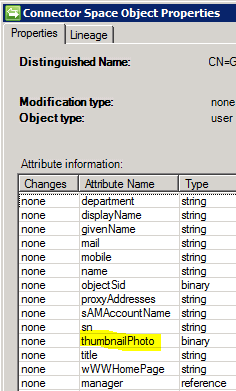
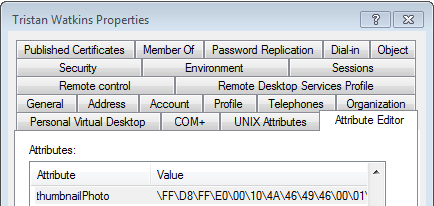
And the money shot. Who wouldn’t want to see this mug in their Outlook every day. :/

Summary
Following this interrogation, it’s clear to me the certificate errors come from the location of the updated profile picture. The errors can be fixed by importing an export of the root CA’s certificate through SharePoint’s Manage Trusts (possibly the site’s certificate itself as well, although the error was on the root trust). That SharePoint 2010 web services (including the User Profile Service Application) do not appear to use the Windows certificate store feels uncomfortable to me, but I imagine this is probably related to the new SharePoint 2010 STS and I will be looking at this topic in more detail in future.
This helped me out a lot! Thanks.
Glad to hear it!
Note: I am now tracking the Manage Trusts topic on TechNet: http://social.technet.microsoft.com/Forums/en-US/sharepoint2010setup/thread/4910f4d8-7459-4eaa-8a8c-4f4a20082909
Tristan,
Thankyou for this great article, I dont have an issue with certificates but I think you have answered a question that nobody else seemed to know – how does SP sync convert the picture profile URL field to the binary object in AD. If it does literally go and get the image using the URL then great. Do you think we would need to have that image in SharePoint or could it be on our Intranet for example: http://ourintranet/staffimages/staffnumber123.jpg what I intend to do is set our users image property in sharepoint like the above url. Then sync to AD and see if the image gets exported – do you think that could work? Im also interested to know if sharepoint will deal with that url pointing externally or will I need to create the thumbnails for it to use in its various views… once again thanks for the excellent article!
Hi Greg,
Sorry about the slow reply. I wrote one earlier today, but I now know not to trust the Windows Phone 7 WordPress app’s comments functionality. It completely swallowed it!
Anyway… this is an interesting question, because I’m not sure of three things:
a) does specifying an external URL in the user profile trigger a separate event that grabs the image and loads the picture in to SharePoint?
b) do the GET events above precede some other event that puts the pictures in SharePoint?
c) Is it the w3wp.exe for the Service Application or the MIIServer.exe process that will matter most in your scenario?
I’m guessing that the SharePoint Service Application (w3wp.exe) gets the data and populates it directly in to FIM, which will then export that data to Active Directory. Whether this means the picture never ends up in SharePoint, and the User Profile Synchronisation Service is effectively just a broker for this export, I’m not sure.
If you’re able to test this I’d be really interested to hear how you get on. If I can find the time I’ll try to test it myself, but time is not something I’ve got much of presently. 🙂
Cheers,
Tristan
Update: Hi Tristan – I finally found time to test one part of this. I used powershell to set the pictureURL property to our external system. example: pictureURL = http://ourIntranetSite/staffpics/staffID.jpg and this worked – the image shows up in the user profiles and in the my site and also the User photos image library in the mysite host is empty so it hasnt copied the image into SharePoint…
Then I ran the powershell script to create thumbnails. Update-SPProfilePhotostore -mysitehostlocation “http://” and sure enough a Profile pictures folder is created in the User Photos doc library and the 3 thumbnails are created and the User profile pictureURL property is updated with the Medium size thumbnail url. I havent tried syncing to AD yet but I dont see why that would not work now as its standard procedure from this point on…
Cheers
Greg
Interesting stuff Greg! At least there’s an easy way to get those thumbnails created. I’d still be interested to see if it can export to AD without running the Update-SPProfilePhotostore cmdlet first though. You’ve piqued my curiosity! That could be quite useful in a few scenarios. Thanks again!
Tristen,
I agree with the other Greg above, great article, thanks for sharing your research!
Glad to be of help Greg (#2)! 🙂
Awesome post! Saved me days of effort and my sanity. Thank you!!!
Hi, thanks for the info’s.
Quick questions, what format you provided the Root Auth Certificate?
Thanks
Hiya. I just added the export of the Root CA’s certificate (without private key) through the GUI if I recall correctly. I believe I just exported it by browsing to the site and navigating to the root certificate and exporting it.
Jumping
Hi Tristan, great article it gives the background info I needed. The only strange thing is that after importing the * certificate in CA plus a IIS reset on both WFE’s the event error still exists but the pictures are stored in User Photos library.
So it didn’t resolve the Event error logging… Any idea why the user profile (increment or full sync) is causing this?
Kind regards, Amancio
Hi Amancio. I think you need to import the parent certificate rather than the certificate itself. So if you’ve bought your certificate from Equifax, you export the Equifax Root CA certificate rather than your own SSL certificate, and then you import the root CA certificate in to SharePoint’s Manage Trusts store. Does that help? I’m kind of surprised this gets things working though. Or have you imported? I may not understand your scenario correctly.
I Have farm with user profile and my sites configuredThere is a two trust between the two farms .When I trying to start the user profile synchronization service i had to use the IP address of the Domain controller as the name could be resolved and it kept saying LDAP server is unavailable.
The user profile service is working and the profiles have imported successfully.
1) I edited the user profile properties to import the user photos which seems to be working now
2) But when I edited the picture property and set the direction to export. The crawl showed not success in the FIM logs for DC_export and the photos where not exported.
I have SSL certificates added to the web front ends . I have also configured AAM.
But the strange part is
I get the same messages you got in the successfull export section .
i.e. Adding x5.09 certificate and the https://site:443/my/User%20Photos/Profile/username.L.jpg
In the logs i get following errors
User Profile Application: SynchronizeMIIS encounters an exception: System.NullReference
Exception: Object reference not set to an instance of an object.
at Microsoft.Office.Server.UserProfiles.UserProfileImportJob.c__DisplayClass2.
b__1()
at Microsoft.SharePoint.SPSecurity.c__DisplayClass5.
b__3()
at Microsoft.SharePoint.Utilities.SecurityContext.RunAsProcess(CodeToRunElevated
secureCode)
at Microsoft.SharePoint.SPSecurity.RunWithElevatedPrivileges(WaitCallback
secureCode, Object param)
at Microsoft.SharePoint.SPSecurity.RunWithElevatedPrivileges(CodeToRunElevated
secureCode)
at Microsoft.Office.Server.UserProfiles.UserProfileImportJob.IsTimerJobRunning
(UserProfileApplicationJob timerJob)
at Microsoft.Office.Server…. e14cf29c-3eae-0052-f803-6f87d11502318
EditProprty::_BuilDSMappingList threw exception : System.IO.InvalidDataException:
Found invalid data while decoding.
at Microsoft.Office.Server.UserProfiles.Synchronization.DSMLAttribute.get_Syntax()
at Microsoft.SharePoint.Portal.UserProfiles.AdminUI.EditProperty._BuildDSMappingList
(SortedList& attributes, Hashtable& propertyDefinitions, Boolean& fHasImports,
Boolean& fHasExports, Boolean& fHasImportFromSelectedConnection)
f74cf29c-0e66-0052-f803-6079ba0a6928
Please can you advise
Hi John. Sorry about the slow and ultimately unhelpful reply. Assuming you’ve also got the certificate chain in SharePoint’s Manage Trusts, I’m afraid I don’t have any ideas. The “Object reference not set to an instance of an object” trace does not give me much to go on.